
Account setup
Binance KYC rejected? What to fix before you submit again
Read the rejection or pending-review message first: mismatched details, an unsupported document and a slow review each need a different fix. Keep your ID inside Binance's official upload flow.
Read the rejection or pending-review message before uploading again. Mismatched details, an unsupported document and a review still in progress need different responses. Do not repeatedly submit the same photo or send your ID to a third-party agent.
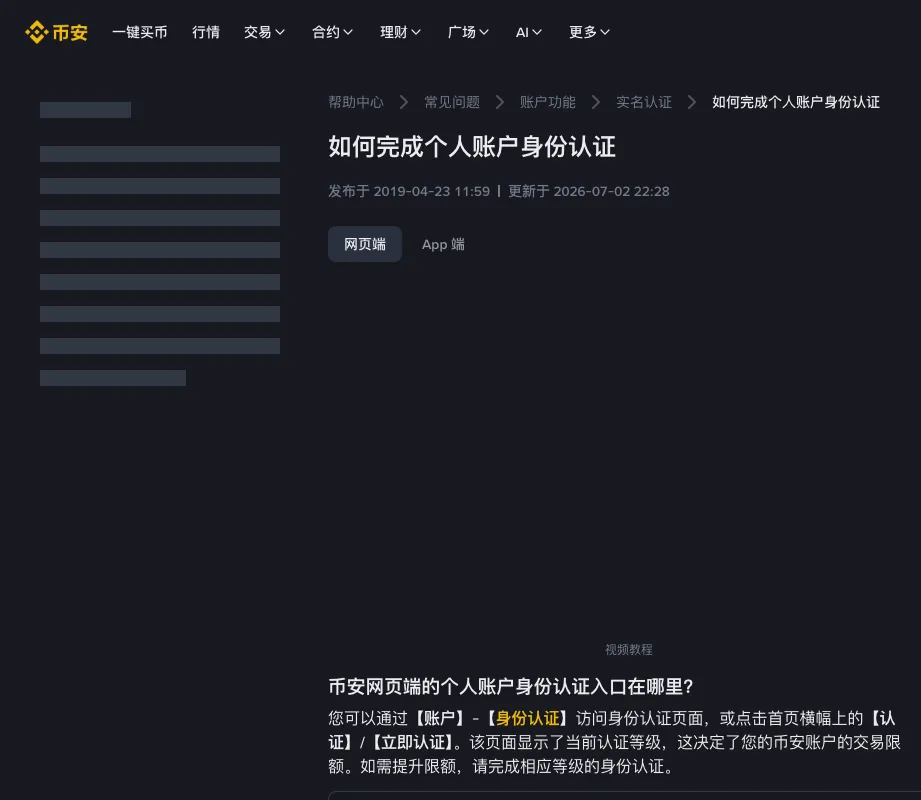
Image: Binance's identity-verification help article. Account → Identification is where you start; the page also says your verification level sets your trading limits.
Where to start identity verification
Binance's help article puts the website path at Account → Identification, or the homepage banner labelled Verify / Get verified. The same FAQ also says all new users must complete standard identity verification to use Binance products and services, including crypto deposits and trading. Existing users who have not completed it are switched to withdraw-only mode, which still lets them withdraw, cancel orders, close positions and redeem.
Document types and whether proof of address is required vary by country. Do not copy another jurisdiction’s list. Whether Binance is available to you is a terms-of-use question. This article does not describe how to bypass a regional restriction.
Match the rejection reason to the document
Personal details must match the ID. Once confirmed, they cannot be edited within that submission. If a document expires or details such as your name change, check the update conditions on the Identification page and follow the official process. For a rejected submission, check:
- Name, date of birth or document number disagrees with the card. Dropped middle names and old surnames can cause a mismatch.
- Residence and document-issuing country mixed up, so the allowed document list is wrong from the first dropdown.
- Glare, cropped edges, or a photo of a screen. The help text also says not to refresh the page during verification.
If proof of address is requested, use the document types and age limit that apply to your jurisdiction. How recent the document must be varies by country: six months in most countries, or up to a year where the document itself states a longer validity, three months in places including Argentina, Australia, Brazil and Spain, and two months in India. Follow the current requirements shown for your account.
A rejected image and rejected personal details need different fixes. If the message says the document is unreadable, submitting a different spelling of your name will not resolve glare. If it says the details do not match, another photograph of the same document may leave the mismatch unchanged.
Lay the document beside the information you entered and compare the fields individually. Middle names, surname order, spaces and an earlier legal name deserve attention; do not shorten a name simply to make a form accept it. If the document uses a different script and the form asks for Latin characters, follow the field's instructions. Where it is unclear which spelling or transliteration is required, ask support which one to use.
A person can live in one country and hold a passport from another. That is why residence and issuing country are separate questions. Answer each accurately. Choosing the passport's country as your residence just because it produces a more convenient document list can create a second problem.
Photo and camera problems
Inspect the original file at full size before uploading: the corners, document number, expiry date and text should be visible, with no thumb, reflection or crop covering them. Retake a poor photograph under more even lighting. Do not retouch identity details or use an image generator to sharpen or reconstruct them.
Camera permissions are another issue entirely. If the live capture step cannot access the camera, check the permission for the verified site or official app on your device. If you switch devices, return through the official account flow; do not upload the document to an unrelated image-conversion site to make the transfer easier.
Do not email ID images to [email protected]. Do not send them into a private chat that offers to “finish KYC for you”.
When proof of address is the missing document
Binance's residential-address verification requirements explain the accepted records, jurisdiction-specific age limits and required identifying details. Check the name, residential address, issue date and issuer; an accepted file format is only the first requirement.
Suppose you have moved and your newest bank statement still shows the previous address. It may be recent, but it does not substantiate the new residence you entered. Obtain an appropriate record from the issuer; do not edit the PDF. Likewise, a household bill in somebody else's name is not evidence in your name merely because you share the address. Check which alternative documents your account permits.
Download an original statement directly from its issuer where available. Follow Binance's document instructions before cropping, obscuring or converting anything: removing information for privacy can also remove something the review needs. A required document belongs only in the verified upload process; keep it off public forums and away from private “verification specialists”.
If the review takes longer than expected
Use the estimated time and any document request displayed in your account. If that time passes without progress, contact support through the official app or website with the submission time, error message and steps already tried. Send any requested documents only through the verified official process.
Passing KYC does not switch on every product. Futures, fiat payment services and P2P can still be blocked by region or risk checks. Before moving funds out, see Checking a Binance withdrawal.
What to tell support after the stated review time passes
Keep a short record of the submission time and time zone, document category, exact status or error, and the correction you already tried. There is no need to paste an ID number into an initial public question. Inside the official support process, explain the difference between what you expected and what the account now shows.
For example: “The identity check is marked complete, but the account still requests proof of address. Which document category is outstanding?” That gives support something specific to answer. “My KYC does not work” could mean a login problem, a failed photograph, a pending review or a product restriction.
Keep the case reference so you can follow the same issue. Do not open accounts under another name or buy a verified account to get around a delay. An account verified in someone else's name stays theirs, and handing over login or recovery details can leave you unable to control it.
After approval, check that the service you actually intended to use is available before transferring funds. Identity verification, product eligibility and a completed deposit are separate steps.
Before you submit
- You are in the official app or on a domain you typed yourself.
- The name, date of birth and document number on screen match the ID.
- Residence, issuing country and document type each answered accurately.
If all three check out and the submission still fails, contact support through the official app or website with the submission time and the exact error message.
Binance help pages used for this guide: How to complete identity verification (viewed 22 August 2026) and the residential-address verification requirements.