
Account setup
Binance withdrawal whitelist: adding addresses and the 24–72 hour limit
The whitelist limits Binance withdrawals to addresses you saved in advance, and the withdrawal limit holds new addresses for 24, 48 or 72 hours. Set both up before you need to move funds, because editing the list can pause withdrawals.
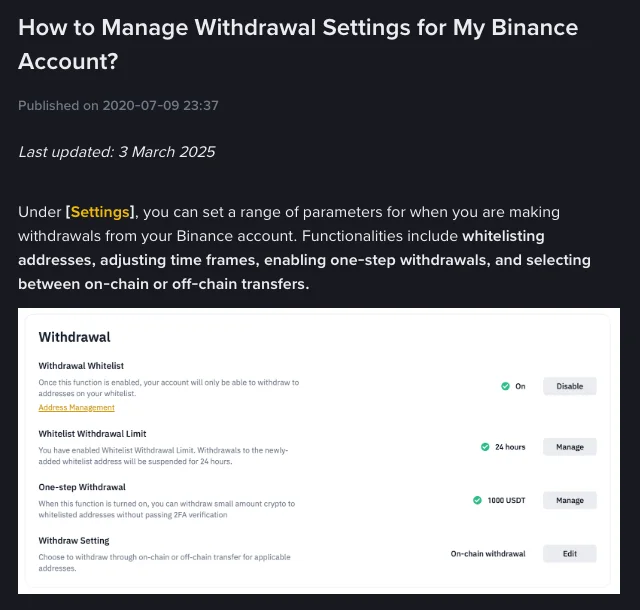
With the withdrawal whitelist turned on, your Binance account can only send crypto to addresses you have saved in advance. Pair it with the whitelist withdrawal limit, and any newly added address stays blocked for 24, 48 or 72 hours. Someone who gets into your account would have to add their own address first and then wait out that period, which gives you time to notice the alerts and lock the account.
The four withdrawal settings as shown on Binance's own help page. The 24 hours and 1000 USDT in the illustration are example values, not defaults.
Three switches in the same section
The whitelist, the withdrawal limit and one-step withdrawal all sit under Settings → Withdrawal, but they control different things:
- Withdrawal Whitelist decides where funds can go. Once it is on, withdrawals only work to addresses on your list.
- Whitelist Withdrawal Limit decides when a new address becomes usable. You pick 24, 48 or 72 hours; during that window, withdrawals to a newly added whitelist address are suspended. Binance describes it as protection against a hacker who adds a new address.
- One-step Withdrawal relaxes checks rather than adding them. It lets you send a small amount to a whitelisted address without 2FA, up to a quota you choose. Binance notes you may still be asked for 2FA with it turned on.
The whitelist on its own stops withdrawals to unknown addresses. It does not stop someone who can log in and pass verification from adding an address and using it straight away. That gap is what the withdrawal limit closes.
Turning on the whitelist
On the website (menu names may change with redesigns, so go by what your account shows):
- Log in, hover over the profile icon and click Settings.
- Scroll to the Withdrawal section and click Enable next to Withdrawal Whitelist.
- Confirm the prompt, then verify with your passkey or 2FA.
The withdrawal limit is enabled from the same section: click Enable next to Whitelist Withdrawal Limit, choose 24, 48 or 72 hours, and confirm. To change the period later, use Manage.
As soon as the whitelist is on, any address not on the list is blocked. If you normally paste a fresh address each time you withdraw, add the addresses you actually use before switching it on.
Adding an address to the whitelist
Addresses live under Settings → Withdrawal → Address Management. Hover over Add and pick Add address (or Add Multiple Addresses), then:
- Give the address a label you will recognise later, such as "Ledger – BNB", rather than "Address 1".
- Choose a specific coin or set it as a universal address. If you choose a coin such as BNB, you also have to choose the network the address belongs to.
- Optionally set the address origin: Exchange Address, Wallet Address or Other.
- Tick Add Address to Whitelist, click Save, and complete 2FA.
You can whitelist up to 200 withdrawal addresses.
A few things the form will not check for you:
- The network has to match the receiving side. The whitelist stores whatever address and network you enter; it does not confirm that the destination supports that network. How networks differ in cost and when to pick which is covered in Binance withdrawal fees by network.
- Memo or tag. If the receiving platform gives you a memo, record it together with the address. A correct address with a missing memo can still leave funds stuck; checks on the receiving side before a withdrawal walks through that case.
- Copy from the source. Take the address from the receiving wallet or exchange itself, then compare the start, middle and end after pasting. Do not copy it from a chat message or a screenshot someone sent you.
Editing or disabling the whitelist can pause withdrawals
Binance's help page words the two cases differently:
- Modifying the withdrawal whitelist may lead to a temporary withdrawal suspension of 24, 48 or 72 hours.
- Disabling the whitelist lets you withdraw to any address, but if you had the withdrawal limit enabled, withdrawals will be suspended for 24, 48 or 72 hours.
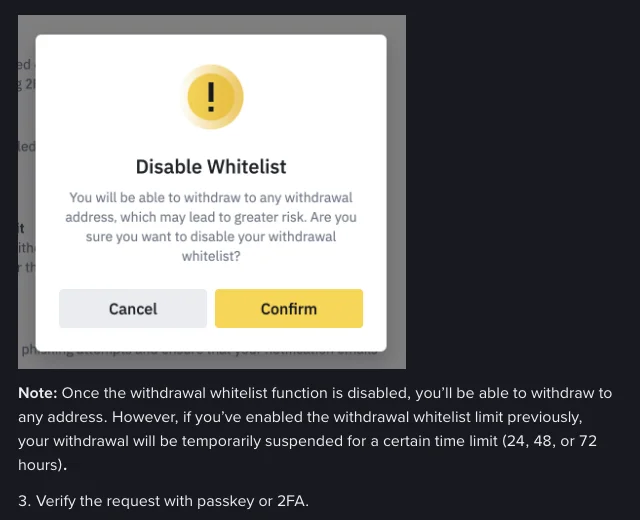
The confirmation dialog shown when you disable the whitelist, with Binance's note on the suspension period.
Turning off the withdrawal limit itself has the opposite effect: Binance says you can then withdraw to every whitelisted address immediately, including ones you just added, so the waiting period disappears along with its protection.
In practice, add the destination address and let the limit period pass well before a payment or a move to another platform is due. If you change the whitelist on the day you need the money, the withdrawal may be held for up to 72 hours.
If you receive a notice that a whitelist address was added or the whitelist was disabled and you did not do it, treat it as a sign that someone else may be in your account. Log in by typing the Binance address yourself or through the official app, change your password, review logged-in devices and API keys, and disable the account if needed. The notice itself may also be fake; how to check whether a Binance email or message is real explains how to verify it.
Should you turn on one-step withdrawal?
One-step withdrawal removes 2FA for small withdrawals to whitelisted addresses, so it is one fewer check between an intruder and your funds. If you use it:
- Set the quota to an amount you withdraw often and could afford to lose, not a large figure for convenience.
- Keep only addresses you own and still use. To remove one, click [...] next to it in Address Management, choose Remove from Whitelist, and confirm.
If you rarely withdraw, there is little reason to switch it on.
What the whitelist cannot protect against
- Addresses you add yourself. If a scammer talks you into adding their address, the whitelist will let the withdrawal through. A fake support agent may offer to "set up your whitelist" or ask you to add an address they provide; stop at any message that asks you to add a withdrawal address.
- Alerts nobody reads. The limit period only buys time if the email address and phone number on the account are ones you check and can still receive messages on.
- Mistakes on your own list. A whitelisted address on the wrong network is still the wrong network, so check the network and memo before each send.
Crypto withdrawals cannot be reversed once confirmed on-chain. The whitelist lowers the chance of funds being sent out by someone else; it cannot recover a transfer you sent to the wrong place.
Source: Binance How to Manage Withdrawal Settings for My Binance Account? (last updated 3 March 2025), viewed 30 September 2026.