
Fees & Transfers
What to check on the receiving side before a Binance withdrawal
Before a Binance withdrawal, check the receiving side: supported network, full address, memo and minimum deposit, measured against the net amount after fees. Also covers who to contact if the funds don't arrive.
Before withdrawing crypto from Binance, open the receiving wallet or platform and check its supported network, full address, memo and minimum deposit. The net amount received must meet that minimum. A wrong address or unsupported network can lead to an unrecoverable loss.
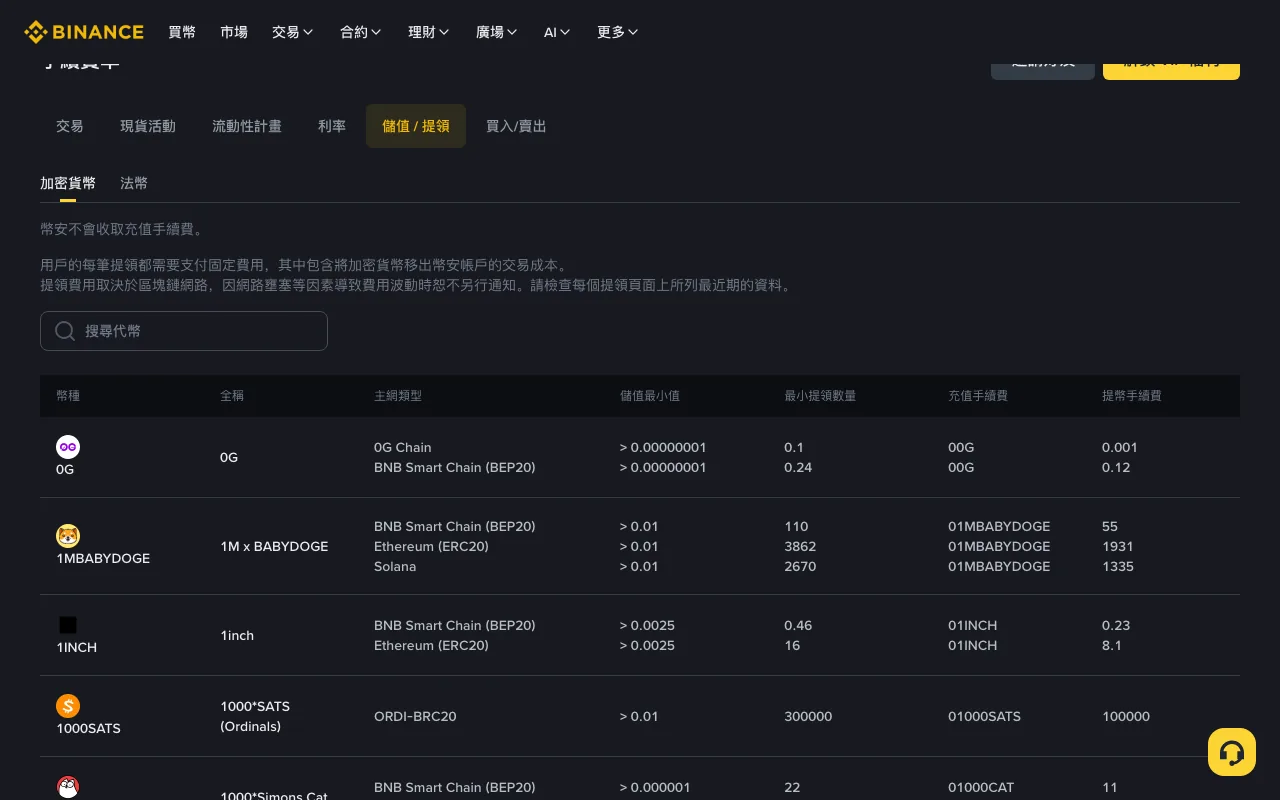
The fee-table screenshot below is from 4 September 2026; fees, minimums and availability vary by asset and network, so read the fee and net amount received again before confirming.
Image: the Deposit/Withdrawal tab of Binance's fee page. The first row that day was 0G, so search for the asset you actually hold.
Which transfer fees can change?
Binance's crypto deposit and withdrawal fee page states, in substance:
- Binance does not charge a deposit fee for receiving crypto;
- each withdrawal pays a fixed amount that includes the cost of moving the asset off the platform;
- that amount depends on the blockchain and can move with congestion, so you should read the latest figure on the withdrawal page itself.
A deposit can still cost money at the sending end. The sending platform may charge a withdrawal fee, or a wallet transfer may incur a network fee. Binance’s receiving fee is only one part of the total.
If you need local currency
If your aim is to receive local currency, sending USDT to another crypto address is only a transfer of USDT. It does not sell it or initiate a bank payment. Work out the whole route before choosing the first withdrawal: where will the asset arrive, can you use that service, and what step converts it to the currency you need? If that step is a P2P sale, read how to check a Binance P2P ad before trading first.
For a self-custody destination, you are taking responsibility for the wallet and its recovery information. For another exchange, you are relying on that exchange to credit the deposit and make the intended service available. Neither route becomes suitable merely because Binance lists a low withdrawal fee. A bank account number is not a crypto deposit address.
Six details to check before a deposit
- Asset: USDT is not USDC. Check the full asset name as well as its ticker.
- Network: TRC20, ERC20, BEP20 and Solana are not interchangeable.
- Address: copy from the destination. Compare the full address after pasting; lookalike addresses can deliberately share the same beginning and ending.
- Memo / tag / payment ID: check the receiving platform’s instructions for the selected asset and network. Some hosted addresses use a memo or tag to identify your account; others need none. Copy it exactly when the destination requires it, and do not invent one.
- Halt status: check whether deposits or withdrawals are currently paused for the selected network.
- Minimum and confirmations: under the minimum, the deposit may never appear.
For a new address, a small test can help confirm that the transfer is credited. It must meet the sending minimum and leave enough after fees to meet the receiving minimum.
Outgoing transfers: pick the asset, then the network, then look at the fee
Start with the networks supported by the destination. A lower fee is worthless if that destination cannot receive the transfer.
Use this order:
- open Withdraw from the official app or a domain you typed;
- choose the asset, then read each network’s status, minimum, fee and amount received;
- confirm the destination lists that exact network;
- copy address and memo together when a memo is required.
Search the fee table for your asset and network; the first row may refer to a different token. For how far the same coin's fee can differ from one network to another, see Binance withdrawal fees by network.
Work backwards from the amount the recipient needs
Here is a hypothetical transfer. Suppose a withdrawal deducts 1 USDT from the amount entered and the destination requires at least 10 USDT to credit a deposit. Entering 10 USDT leaves 9 USDT arriving: below that minimum. Entering 11 USDT would leave 10 USDT under those assumptions.
The actual confirmation screen may present the requested amount and fee differently, so use its explicit amount received. Do not infer it from this example.
After a transfer has been credited, recheck the destination before the next one. A credited transfer only tells you what happened to that transaction; the address, memo or network status for the next deposit may have changed. Keep the saved destination labeled with the asset and network so that an old entry is not mistaken for a different route.
Fiat on the way in or out is a different bill
Card payments, bank transfers and third-party processors vary by country. A “zero fee” label can sit next to an FX spread or an issuer’s foreign-transaction charge. P2P, where it exists for your fiat, adds the advertiser’s price gap and release time.
If the transfer has not arrived
If Binance still shows processing and no transaction ID (TxID), check its withdrawal record and status notice first. Do not send repeated test withdrawals or pay someone privately to accelerate the process.
If a TxID is available, use the relevant blockchain explorer from the official record to check success and confirmations. Compare those with the receiving platform's requirements. A successful on-chain transaction does not necessarily mean the platform has credited your balance. If sufficient confirmations have passed or the memo was wrong, contact the receiving platform through its official support process and provide only the requested transaction details. Never share a password or recovery phrase.
Which side should you contact?
Start by working out where the transfer stopped, using the withdrawal record, blockchain result and receiving account together:
| What you can establish | Next check |
|---|---|
| Sender still processing; no TxID shown | Sender's withdrawal status and support |
| TxID found, but confirmations still short | Required confirmations on the destination |
| Chain succeeded; destination has not credited | Receiving platform's deposit record and support |
| Asset, network, address or memo differs | Receiving service's recovery eligibility |
Binance's missing-deposit guidance distinguishes insufficient confirmations, unsupported deposits, incorrect details, minimum amounts and maintenance. Those are different problems, and “the blockchain is slow” explains only some of them.
For an on-chain transfer, distinguish the sender's internal withdrawal reference from the blockchain transaction hash. If an explorer shows no result, first check that you opened the explorer for the selected network and copied the complete hash. Do not assume that changing the network name in a search will reveal the funds. If the sender says this was an internal transfer with no on-chain transaction, ask that service how to find the transfer record.
Make one useful support request
Record the asset, network, amount sent, displayed fee, expected amount received, transfer time with time zone, destination address, memo if required, and TxID or internal reference. Add the status shown at both ends and the exact question: for example, whether this confirmed transaction qualifies for crediting or needs a recovery application.
Send that through the relevant service's official process; keep it out of public comments and strangers' direct messages. Posting transaction hashes and addresses can connect your identity to a transaction history. Keep screenshots of balances and unrelated transfers out of public posts. Submit additional evidence privately only when the verified support process requests it.
Do not make another withdrawal to the same route while the first unexplained failure remains. A recovery form only asks for an assessment and promises nothing; read any supported-case conditions and charges before accepting them. If somebody instead asks for a private “activation payment,” stop and verify the request independently.
Before you press Confirm
Go through the six details above on the withdrawal screen itself before you confirm. Chain transfers are not reversible. Support cannot always recover a wrong network. Price can move while you wait for confirmations. This is not investment advice.
For spot trading fees, see Binance fees explained, and read the Binance risk warning before trading.