
Account setup
Binance referral ID and invitation code: where to enter BNB1088
Check that Binance serves your country, sign up through the official domain and confirm that referral code BNB1088 was actually recorded in your account. Also covers when a missed code can still be added.
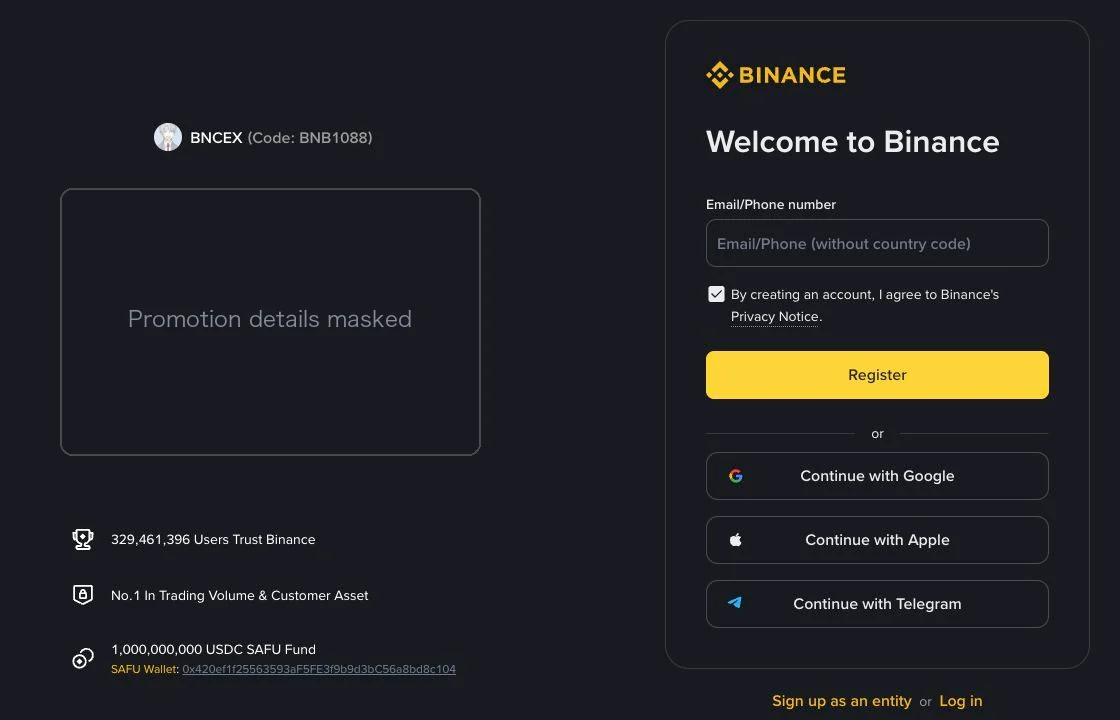
On the Binance sign-up page, the referral code belongs in the Referral ID (or Inviter) field: when that field appears, check that it shows BNB1088, this site's code, before you submit. An existing account can add a missed code only if it meets every condition in Binance's Referral Pro FAQ: its identity verification details have not been used for another account in the past 180 days; it has no referral relationship yet; it is a main account, not a sub-account; it was registered within the last 30 days; it has no deposit or trading history; and it has not been flagged as a wash trader.
Before creating an account, check that Binance offers the service in your country. A code in a web address shows what the link carries; it does not prove that Binance has attached it to your account or which promotion terms apply to you.
Register on Binance with referral code BNB1088
This is an affiliate link, and nelunor may receive commission from qualifying activity. This affiliate link is not intended for residents of the US, the UK, Singapore, Hong Kong, the EU/EEA, or countries on Binance's prohibited list. On 5 September 2026, following this link opened a Binance registration page naming BNCEX as the inviter and showing code BNB1088. Promotions on that page change by date and region, so we do not restate them here. Read Binance’s own terms for the products, conditions and dates that apply to you.

Check the destination before entering your details
The main site is www.binance.com and the registration form may open at accounts.binance.com. Inspect the full domain, beyond the word Binance somewhere in the address, and enter your password, verification codes and identity documents only there.
The official registration page captured on 5 September 2026 shows inviter BNCEX and code BNB1088 on the left, with the sign-up form on the right. We have masked the promotion panel; the remaining statistics are what the official page displayed at that time and say nothing about your own eligibility. Screens and subsequent steps may differ by location and device.
Open the full-size registration screenshot to zoom in
Before choosing a sign-up method
Use an email address or other supported login method you expect to control for the long term. A work mailbox that disappears when you leave a job, or a phone number you are about to give up, can turn an ordinary login into an account-recovery problem. If you choose a third-party sign-in option, note which provider and account you used. A different button on your next visit may not take you back through the same route. Do not let a person offering registration help supply the email, phone number or authenticator for you.
The language of the page tells you nothing about eligibility. An English interface can serve readers in many countries, and a referral link does not remove local restrictions. Read the service terms presented to you and confirm that the product you intend to use is available. If it is not, stop there; do not select a false residence.
Check the code during registration
- Look for ref=BNB1088 in the official URL. This checks the link, not the completed referral relationship.
- Choose a sign-up method that Binance offers to you and that you control. Follow its verification prompts; do not buy or borrow an account.
- If a Referral ID or Inviter field appears, check that it contains BNB1088.
- If the page lists a promotion, read Binance's terms on product coverage, expiry and eligibility before accepting.
- After registration, check the referral information inside your account.
We have not completed registration with a personal mailbox or checked whether this code was recorded in an account. We therefore cannot promise that a referral field will appear on a particular later step. If the flow gives you no way to confirm it, ask Binance Support before proceeding on the assumption that a benefit applies.
Ask what the offer covers
A confirmation that the account was created does not tell you which promotion terms apply to you. Look for the offer's own terms and the referral information available in your account. If they are unclear, save the offer wording and date without exposing private account details, and ask official support this specific question: which product and eligible fees does this offer cover for my account?
Decide whether the service and its costs suit you before considering a reward. A successful registration does not require an immediate deposit, and a countdown on a promotion does not make that deposit safer.
If you already have an account
According to the official Referral Pro FAQ, a missed code can be added only when every one of these conditions holds: the identity verification details on the account have not been used for another account in the past 180 days; the account has no referral relationship yet; it is a main account, not a sub-account; it was registered within the last 30 days; it has no deposit or trading history; and it has not been flagged as a wash trader. Check the referral section in your own account against that list.
Do not deposit merely to test a referral benefit. Do not close and reopen an account to change codes. nelunor cannot bind a code, change a referral or approve an exception for you.
If registration stops
If a verification message is missing, write down the exact error before requesting another one. Was the address rejected, was a resend timer running, or was the message sent but absent from the inbox? Check the contact details you entered, your spam folder and filtering rules, and the resend timer shown by Binance. Our guide to Binance verification codes that don't arrive goes through these checks in more detail. Repeated requests make it harder to tell which message belongs to the current attempt, so use the current prompt and timer and ignore any old code someone has forwarded to you. Never send the code to someone offering to finish registration for you. If the address is already registered, use the official login or account-recovery process; don't keep opening new accounts.
Identity verification is a separate step. Use the document list offered for your residence and submit it only through the official account flow. Our verification troubleshooting article explains how to respond to a rejected check without sending documents to a third party.
When the browser and app seem to disagree
First establish whether registration finished. A form that accepted an email address is not the same as an account-creation confirmation. If you did finish, try the official login flow using the same method you chose, then check the account status there. Avoid creating another account merely because an app starts on a sign-up screen.
If a support contact appears while you are troubleshooting, leave the message and open support from Binance itself. Our phishing article explains what to check before sharing anything.
Secure the account before funding it
Open the account's security settings and review the options actually available on your device. Binance's passkey instructions describe adding one through the Security section.
Know where the passkey is stored and how its provider handles a lost device. Do not delete your existing recovery method before understanding the replacement. If you use an authenticator, protect its recovery information; do not photograph it for someone who claims to be checking your setup. Keep a copy of recovery information somewhere other than your phone, so you can reach it if the phone is lost. Secure the email account used for recovery as well as the exchange account: use distinct passwords where passwords apply, enable the additional verification each one offers, and review unfamiliar logged-in devices.
Only after you can reliably access the account should you consider a transfer. Even then, read the receiving instructions first. Registering successfully does not make every asset or network supported.
A referral code is not the same as paying fees with BNB
BNB1088 is a referral code. Paying trading fees with BNB is an account setting. The BNB-discount column on Binance's fee table describes that setting and says nothing about this referral code.
If your account shows a referral-related promotion, check which fees it covers and when it takes effect. Do not count bank charges, withdrawal fees or investment losses as costs a referral will recover. The spot-fee article explains how to check the actual charge after a trade.
Until the referral section of your own account shows the relationship, plan your costs as if no referral benefit exists. If you cannot understand the costs or afford the potential loss, stop before depositing. Crypto assets can lose substantial value and transfers may be irreversible.