
Account setup
Is a Binance email or message real? Check with Binance Verify
A message that claims to be from Binance can be checked with Binance Verify before you sign in. The guide also covers lookalike domains, fake support chats and what to do if you have already shared a password, code or wallet seed.
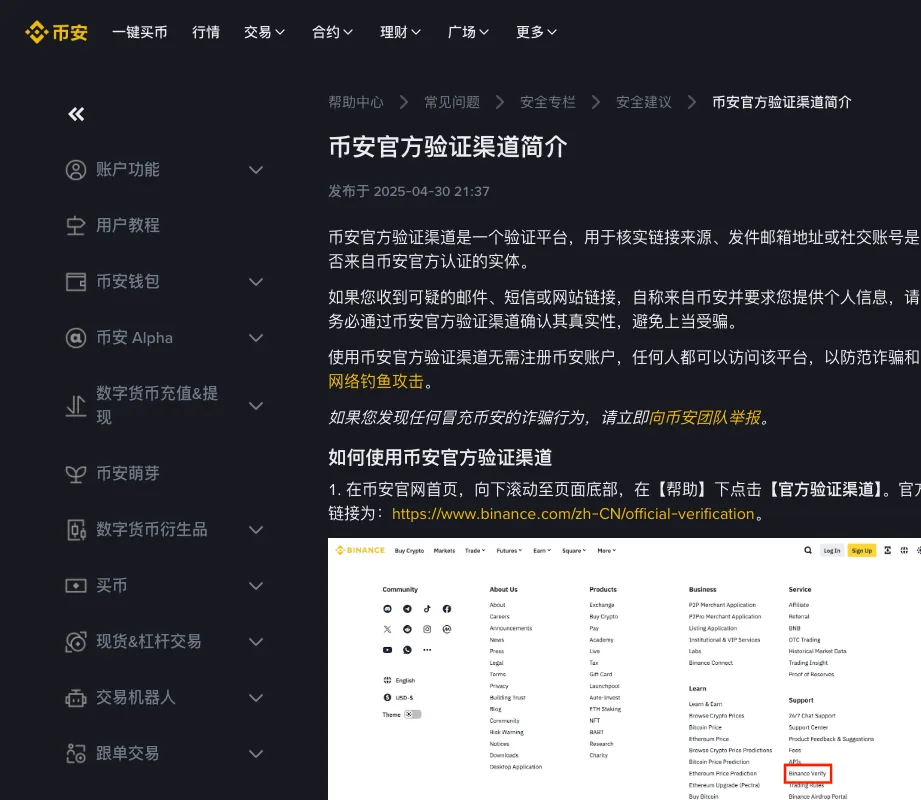
If a message asks you to log in, share a security code or send funds to unlock an account, pause. Open the verified Binance app or official website yourself and check the account there. A search position, logo or HTTPS padlock alone does not prove that a message is genuine.
Image: Binance's “What is Binance Verify?” help page. Look for the line saying you can check a link, sender email or social handle without a Binance account.
Check the full domain
Binance's FAQ on URL spoofing lists search results, browser extensions, third-party apps and email as ways phishing can reach you. A cloned page layout is easy to build, and a single changed letter in the domain can be enough to mislead you. HTTPS encrypts the connection; phishing sites can use it too.
Type www.binance.com yourself. Skip short links in chat, and skip buttons that say the account will freeze unless you “verify now”.
A convincing example of the wrong address
Consider this fictional message: “Your withdrawal has been suspended. Confirm your account now.” Its button displays the word Binance, but the destination is binance.com.example.org. The service name is only a subdomain of example.org.
Do not investigate by entering a password to see whether the page accepts it. Leave the message and open the account independently. If there really is an account restriction, deal with it from there. The same approach works for a fake refund, a supposed referral reward or an unexpected identity check: go to the account directly rather than through the message.
On a phone, a shortened address display can hide important parts of the domain. Expand it before entering sensitive information. A saved bookmark can help you avoid a fresh search each time, but only if you verified the address when saving it.
What Binance Verify is for
Binance's help article describes it as a check on whether a source link, sender email or social handle belongs to an official Binance entity. If a message claims to be from Binance and asks for personal data, check its source with the tool before you sign in.
The page says anyone can use it and points to the site footer, Help → official verification, which opens Binance's official verification page.
Spotting fake support in chat apps
A Telegram or WhatsApp account that calls itself the “risk control” team and asks for the password, SMS code, authenticator code, seed phrase, or a remote-desktop session is not the in-app help desk. Official support does not collect those in a cold chat. If you went looking for help because a verification code never arrived, the checks for a missing Binance verification code are ones you can run yourself.
If you set an anti-phishing code, official mail should display it. A missing or wrong code is a reason to ignore the buttons in that message. Even with the correct code, open the official app yourself to check the notification. KYC photos do not belong in a chat that offers to “finish verification for you”.
Do not send coins to “unlock” an account at a stranger’s request. If documents are requested, open the verified app or website yourself and check the official verification or support process there; do not submit them through a link from an unsolicited message.
Check the exact address or handle, not only a display name copied into a conversation. Even when a source checks out, consider what you are being asked to do. A request to surrender your recovery phrase or give a stranger remote control is not made safe by a correct logo, familiar email thread or anti-phishing code.
A support problem posted publicly with contact details or screenshots hands impersonators a ready-made story, so keep the case inside the channel you opened yourself.
If you have already shared information
If you only opened the page, entered nothing and installed nothing, close it and check notifications from the official app. If you downloaded software or allowed remote control, end that connection and use a trusted device for account-security changes.
If you shared a password or authentication code, enter through the official service on a trusted device, change the password and review logged-in devices, API keys and security settings. Revoke access you do not recognise. Report unexpected transactions or loss of access through official support and use the account's disable function where appropriate. Do not give the original contact another security code.
If you exposed a self-custody wallet recovery phrase, changing an exchange password does not protect that wallet. Stop depositing to it. Follow the wallet provider’s official security instructions to create a new wallet with a new recovery phrase on a trusted device before addressing remaining assets. Importing the old phrase into another app does not remove the compromise.
If funds have already left, preserve the transaction ID, time, destination, original messages and payment records. Contact the relevant platform or bank through its official fraud process and report the incident through the appropriate local channel. Recovery is not guaranteed. Do not pay a supposed recovery agent an additional unlocking fee.
If the email account is involved too
Do not stop at changing the exchange password if somebody also accessed the mailbox used for login or recovery. From a trusted device, use your email provider's account-security and recovery process. Review unfamiliar sessions, recovery contacts and forwarding rules; a forwarded mailbox can expose new messages after the original incident.
Use a different password from the compromised one, including on any other service where you reused it. CISA's password guidance recommends long, random, unique passwords, and multifactor authentication adds a separate layer. Those measures protect the account from here on; whether you have regained control after a break-in is a separate check. If you cannot regain control of the mailbox, tell Binance through verified support rather than continuing to send recovery messages into it.
Keep wallet recovery separate from exchange recovery
A custodial exchange login and a self-custody recovery phrase control different things. Establish which one you exposed before following a recovery guide. Changing a Binance login cannot revoke a wallet phrase, and a new wallet password does not invalidate the old phrase either.
For a compromised self-custody wallet, read the wallet provider's current instructions before attempting further transfers. MetaMask's compromised-wallet guidance specifically warns against adding gas funds when a sweeper may be present. Repeatedly topping up a drained wallet can create further losses. Do not improvise a rescue from instructions sent by the person who first contacted you.
In an incident report, list only what you did (opened a page, typed a password, approved a prompt, installed software or sent funds) and never include a recovery phrase, password or fresh authentication code in the report.
Binance help pages used for this guide: What is Binance Verify? (viewed 22 August 2026) and the FAQ on URL spoofing.