
Fees & Transfers
Binance P2P seller not releasing crypto after payment: when to appeal
Paid on Binance P2P and the seller has not released? Keep the order open and appeal from the Pending Release page. The rules give the seller 15 minutes after a real-time payment or two working days after a slower one.
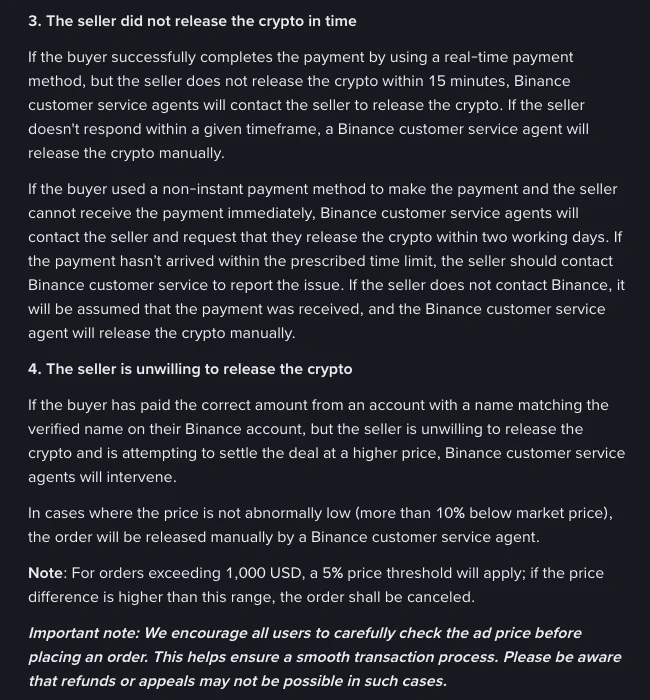
If you have paid for a Binance P2P order and the seller has not released the crypto, leave the order open, do not cancel it, and use the [Appeal] button on the order's Pending Release page. Binance's appeal rules give the seller 15 minutes after a real-time payment, and up to two working days after a non-instant one, before customer service steps in. The rules state that they apply to non-CNY trades only.
Image: the two buyer-side sections of Binance's appeal rules that cover a seller who has not released, viewed 6 October 2026.
Check your own payment before you appeal
An appeal is decided on evidence, and three details of your payment change the outcome under the rules.
- The recipient. The money has to go to the account shown in the order's payment details. If a buyer pays a different account or a third party, the rules say a refund is not guaranteed and Binance is not liable for the loss.
- The payer name. The name on your bank or wallet account has to match the verified name on your Binance account. Where it does not, the rules say the crypto will not be released, the seller is asked to refund the full amount, the buyer's P2P function is suspended, and any fees fall on the buyer.
- The amount. If you paid more than the order amount, customer service asks the seller to refund the difference, and the loss is yours if the seller refuses. If you paid less, you are asked to pay the remainder within a set time, with any extra fees on your side.
Also confirm in your banking app that the transfer has completed. A payment still shown as pending or scheduled has not reached the seller, and they have no reason to release yet.
How long the seller has before Binance steps in
| Your situation | What the appeal rules provide |
|---|---|
| Paid by a real-time method, no release after 15 minutes | Customer service contacts the seller. If the seller does not respond within a given timeframe, an agent releases the crypto manually. |
| Paid by a non-instant method | Customer service asks the seller to release within two working days. A seller whose payment has not arrived must report that to customer service. If they stay silent, the payment is treated as received and an agent releases the crypto manually. |
| Seller refuses and asks for a higher price | If you paid the correct amount from an account in your verified name, customer service intervenes. An agent releases the order manually unless the order price was abnormally low, defined as more than 10% below market price. For orders above 1,000 USD the threshold is 5%, and an order outside that range is cancelled. |
| Your transfer remark contained words such as "Binance", "P2P" or "BTC" against the seller's terms | Customer service contacts the seller to either release the crypto or refund you. Refund fees are yours. |
The rules do not say how long "a given timeframe" is, and they do not list which payment methods count as real-time. If your bank describes the transfer as next-day or batch processed, plan around the second row.
A seller who asks you to cancel and reopen the order at a new price is describing the third row. Cancelling moves you out of it, so keep the order as it is and appeal.
Filing the appeal on the Binance website
Binance's buyer instructions for the website are:
- Log in, go to Trade, then P2P, then Orders, and open the order.
- On the Pending Release page, click [Appeal].
- Select a reason, describe what happened, and attach your proof.
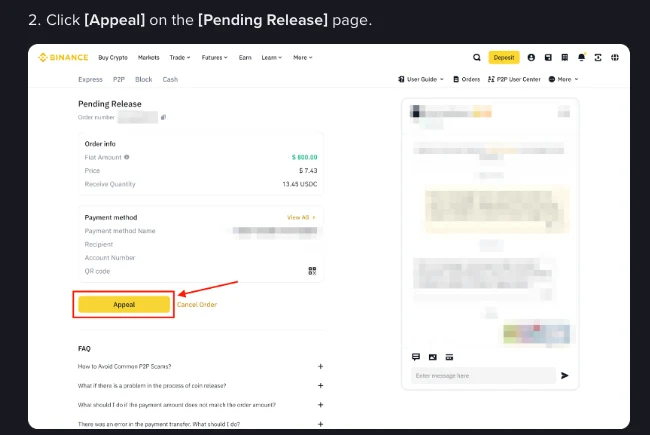
Image: the Appeal button on a Pending Release order, from Binance's help article (updated 23 December 2025). Cancel Order sits right beside it.
The appeal form shown in that article has a mandatory reason, a description limited to 500 characters and a mandatory payment-proof upload of up to five files and 200 MB in total. It also warns that the reason and the proofs are visible to the buyer, the seller and customer service, so leave out anything the seller does not need to see.
After you submit, the seller has a 10-minute window to reply, and one of three things follows:
- The seller selects [Consensus reached]. You confirm, and the system releases the crypto.
- The seller selects [Negotiation failed]. The status changes to "Under Review" and a customer service agent takes over. Binance says updates arrive by email and SMS.
- The seller does not answer within 10 minutes. The status also changes to "Under Review".
[Cancel Appeal] is for cases where the two of you have settled it. If you click it by mistake, you have to wait 5 minutes before you can submit again. The mobile app follows a separate guide with its own Buy Orders tab, linked at the end.
What proof to prepare
Binance's video-proof guide says a video can speed up an appeal and that a wrong one causes delays. Its requirements are specific:
- Record with a second phone or camera. Screen recordings are not accepted, and neither are cuts or edits.
- Show the login to your bank or payment app with the password covered, then the account name and account number.
- Open the transaction and show the amount and currency, the sender and receiver names and account numbers, the date and time, and the status.
- Keep the file under 200 MB.
Put the bank reference number in the appeal description so the video can be matched to the order.
If the order was cancelled after you paid
The rules treat this case less favourably. When an order times out or is cancelled by mistake after the buyer has paid, customer service contacts the seller for a refund on a best-effort basis, and Binance states it is not liable if the seller refuses. Two habits follow from that: click the paid button as soon as the transfer has really gone, so the order does not time out, and never cancel an order you have paid for.
If it has already happened, do not open a new order in the hope that the old payment will attach to it. Appeal the cancelled order instead. In the app, Binance's guide gives the path as P2P, Orders, Fulfilled, Canceled, then [Need Help] on the order, with [I paid but the order is cancelled] as the reason. The same guide has a Website tab and asks you to allow customer service 15 to 30 minutes to review and respond.
Messages that arrive outside the order
Everything in the appeal process happens inside the order: the chat, the form and the status. Someone who contacts you on Telegram or WhatsApp as a "Binance agent" and asks you to cancel, pay again or share a code is not part of that process. You can check whether a Binance message or contact is real with Binance Verify before replying.
For the next order, most of these disputes are settled by details visible before you pay. Our guide to reading a Binance P2P ad and its payment terms covers the payment method, the timer and the advertiser's terms.
Sources, viewed 6 October 2026: Binance P2P Appeal Handling Rules (last updated 15 October 2024), How to Appeal for P2P Orders on Binance Website, on the Binance App, How to Appeal for Canceled/Completed P2P Orders and How to Record a Video Proof for Binance P2P Appeal. Binance can change these rules, and an appeal does not guarantee release or a refund.