
Fees & Transfers
How Binance spot fees are calculated at the 0.1% standard rate
Binance spot fees for regular users are 0.100% maker and taker, or 0.075% when paid with BNB. Estimate the fee on a trade, then confirm the amount and asset charged in your trade history.
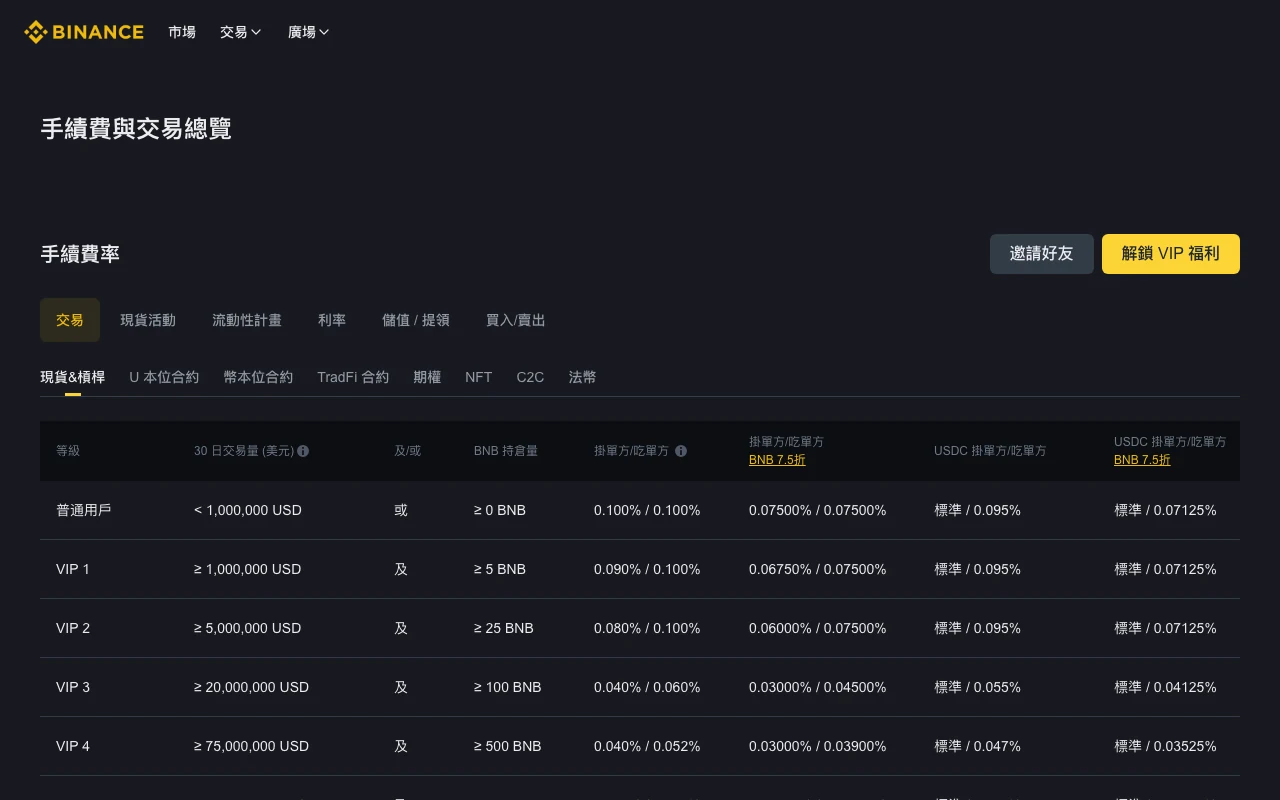
The standard Binance spot trading fee for a regular user is 0.1% of the executed value, the same for maker and taker orders, according to Binance's official spot fee schedule. To estimate a fee, multiply the executed trade value by the rate that applies to your account. Deposits, bank charges and withdrawal fees, which are set per network, need separate checks. After trading, compare the estimate with the amount and charged asset in trade history.
Regular-user spot maker/taker on Binance's fee page, checked on 16 September 2026: 0.100% / 0.100%, or 0.075% / 0.075% with the BNB 25% discount. In the USDC column, maker is marked Standard, meaning the maker rate for your VIP tier (0.100% for a regular user), and taker is 0.095%. With BNB, USDC maker stays Standard and taker is 0.07125%. USDC/USDT pairs themselves are listed at zero maker and taker fees. Your account, trading pair and any applicable promotion determine the rate you actually pay.
Image: the spot fee table on 4 September 2026; the regular-user cells were the same on 16 September. Read the regular-user row across the standard, BNB and USDC columns.
First identify the cost you are looking at
Moving funds from a bank or wallet to an exchange, trading, then withdrawing can involve three types of cost:
- Deposit cost: this may come from a bank, card processor, payment provider, sending exchange, or blockchain network.
- Trading fee: a completed Spot order is normally charged against its executed value at the maker or taker rate that applies to the account.
- Withdrawal cost: a crypto withdrawal depends on the asset and network; a fiat withdrawal depends on available local payment methods and providers.
A 0.1% trading rate therefore does not mean the whole movement costs 0.1%. Network fees, payment-provider fees, and spread can matter more than the trade fee.
Maker and taker fees in plain terms
A maker order adds liquidity by resting on the order book instead of executing immediately. A taker order removes existing liquidity. A market order is generally a taker. A limit order is not automatically a maker: if its price crosses the book and executes immediately, it can still be charged as a taker.
The basic calculation is:
trading fee = executed value × actual fee rate
For a 1,640 USDT execution at 0.100%, the fee is 1.64 USDT; if the 25% BNB discount applies (0.075%), it is about 1.23 USDT. These figures only illustrate the formula; your account's rate may differ.
The applicable rate can depend on VIP tier, recent volume, BNB holdings, product, pair-specific promotions, and region. Use the rate the official fee page or your account preview shows now.
One order, several fills
An order is your instruction; a fill is the part that actually trades. Start with fills when a fee looks wrong.
Here is a made-up spot purchase with no discounts. Assume both fills are charged at 0.100%, and use USDT equivalents to compare the fees:
| Fill | Executed value | Fee equivalent |
|---|---|---|
| First | 240 USDT | 0.24 USDT |
| Second | 360 USDT | 0.36 USDT |
| Total | 600 USDT | 0.60 USDT |
If you originally submitted a 1,000 USDT order and canceled the unfilled 400 USDT, calculating commission on the full 1,000 would overstate this example's charge. One order can also have more than one maker/taker role: a portion may trade immediately while another rests on the book. The official explanation of transaction-fee calculation covers partial executions and the asset used for commission.
The regular-user spot rates shown above are the same for maker and taker, so at those rates waiting for a maker fill saves no commission by itself. A limit price still controls what you are willing to pay.
Why the fee may not appear as a USDT deduction
The table expresses value in USDT; your history may record commission in the asset you bought or in BNB. Compare both the amount and its unit. A hypothetical 2-unit purchase with a 0.1% fee deducted in that same asset leaves 1.998 units. That 0.002 difference is the fee, not missing funds. If a leftover like this falls below the pair's minimum order value, a regular spot order cannot sell it; Binance minimum order sizes and small-balance conversion covers what to do with it.
For a past BNB deduction, converting it at today's BNB price can produce a different USDT figure from its value at execution. Keep the original charged amount and asset in your records. If a discrepancy remains, gather the pair, fill time, executed quantity, execution price and commission entry before asking support. Your VIP level today may differ from the one that applied when an earlier trade filled, so a screenshot of today's level proves little on its own.
What the BNB fee option applies to
The spot fee table has a “BNB 25% off” column. That option applies to eligible trading fees; bank charges, card fees, blockchain gas costs, withdrawal fees and spread sit outside it.
Before relying on it, check all three conditions:
- fee payment with BNB is enabled for the relevant product;
- enough BNB is available in the account to cover the commission;
- the current order or fee view still displays the discount.
After execution, the commission field in trade history is stronger evidence than a settings toggle. If the BNB balance is insufficient, the charged asset or amount may differ from what you expected.
A referral offer is separate from the BNB fee-payment setting. Check the account’s fee rate and the referral terms separately.
If you do not have an account and the service is available where you live, you can register on Binance (affiliate link). Qualifying trades may earn nelunor a commission. nelunor has no confirmation of a fee discount attached to this code, so price your trades at the rate your own fee page shows. Do not trade more to pursue an offer. Nothing here is investment advice.
The link is not meant for residents of the US, the UK, Singapore, Hong Kong or the EU/EEA, nor for anyone in a country on Binance's prohibited list.
Put a cash value on the discount
At the illustrative rates of 0.100% and 0.075%, the difference is 0.025 percentage points. Across 2,000 USDT of eligible executed value, that saves the equivalent of 0.50 USDT. It does not save 25% of the 2,000 USDT.
That calculation is worth doing before holding an extra asset just for a discount. BNB can move in price, and acquiring or later selling it can have costs of its own. Estimate the saving on trades you already intend to make.
A cheaper fee can still mean a worse purchase
Suppose two hypothetical quotes sell exactly the same amount of crypto. One costs 500 USDT plus a 0.50 USDT fee. The other displays no separate commission but asks for 502 USDT. The totals are 500.50 and 502 USDT. The zero-commission quote is more expensive in this example.
The example shows a way of comparing quotes and describes no particular Binance product. Use quotes for the same asset, quantity and direction, taken close enough together to be comparable. If the quote changes before confirmation, redo the comparison. A fee page cannot tell you the execution price you will receive, and a wallet's approximate fiat valuation can differ from the price a sell order would actually get.
Deposit costs beyond the platform fee
Crypto deposits
The receiving platform may not add a separate crypto deposit fee, but the sender can still charge a withdrawal fee and the blockchain can still impose a network cost. Before sending, check:
- same asset on both sides;
- exactly the same network;
- complete destination address;
- memo, tag, or payment ID where required;
- current deposit/withdrawal availability for the network;
- minimum deposit and required confirmations.
Networks with similar names are still different networks. Sending a token through a network the destination does not support may prevent automatic crediting and can cause an unrecoverable loss. A small test transfer is worth more than the saving on a marginal network fee.
Fiat deposits
Bank transfer, card, and third-party payment availability vary by region. Compare the platform fee, provider fee, foreign-exchange spread, and any bank charge. A screen that says “zero fee” can still carry a cost in the conversion rate.
Withdrawal costs change by asset and network
A crypto withdrawal commonly shows a fixed asset amount or a dynamically adjusted amount as its fee. Congestion, maintenance, and product policy can change what is displayed.
Use this sequence before you submit:
- Open the withdrawal screen from the official Binance app or a domain you typed and verified yourself.
- Select the asset, then inspect the available networks; do not reuse a network from memory.
- Copy the destination from the receiving service and confirm that it supports the same network.
- Add and verify the memo/tag when required.
- Read the displayed fee, net amount received, and minimum.
- Test a new address with a small amount before sending more.
Check support before choosing the network with the lowest fee. If the receiving service does not support that network, the small saving can turn into an unsupported transfer or an extra bridging step later.
Futures uses a different schedule
USD-M futures have their own rates and BNB column, and the fee is charged on the executed contract value. For the breakdown, see how Binance futures fees are calculated. You can lose the entire margin on leveraged products.