
Fees & Transfers
Binance deposit fees: free for crypto, 0 to 3.6% for fiat by payment method
Crypto deposits to Binance carry no fee from Binance, only a minimum per network. Fiat is priced by payment method: on 7 October 2026 bank transfer showed 0 and card deposits 3.3% in EUR or 3.6% in USD.
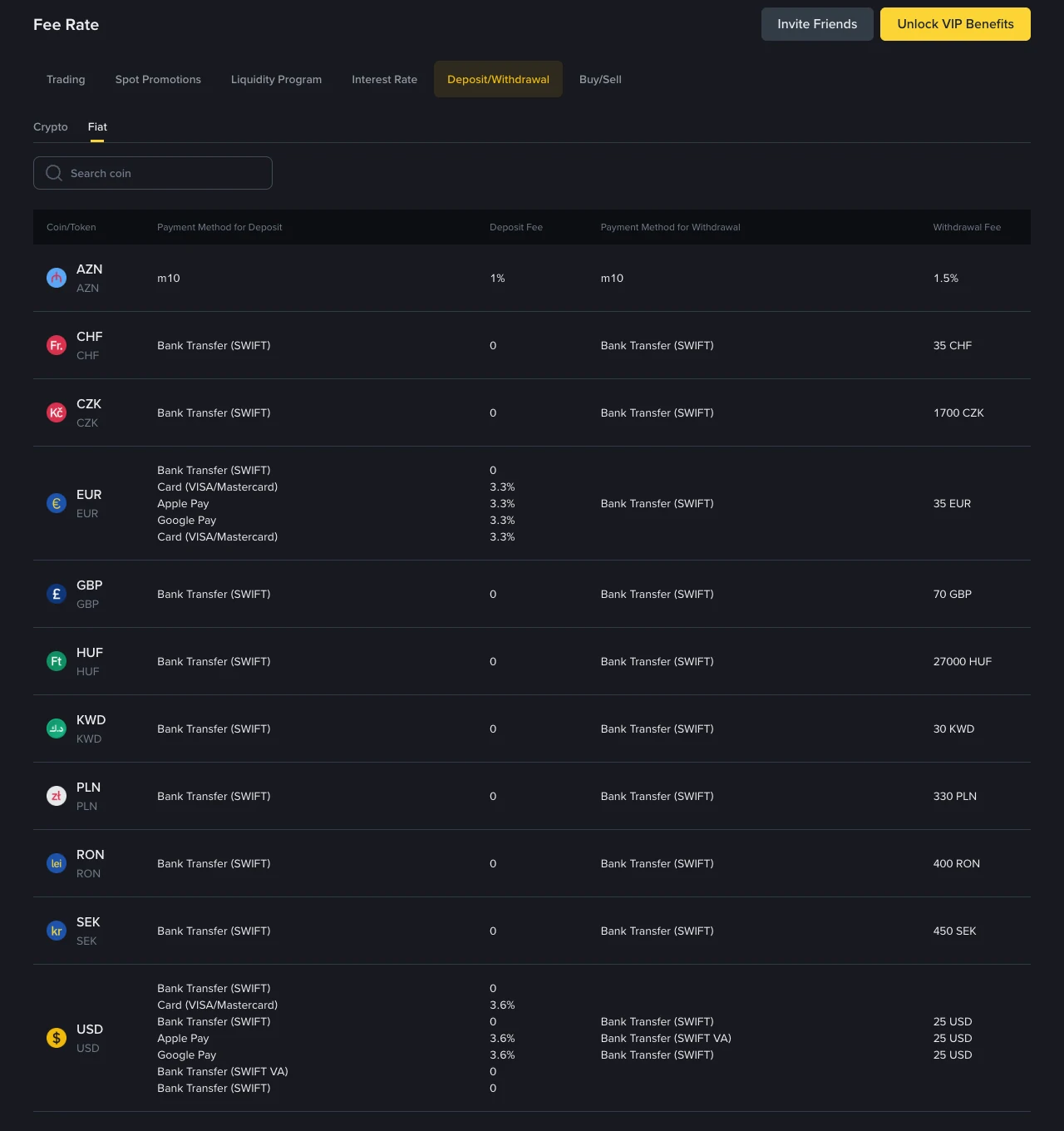
Binance does not charge a fee for depositing crypto. Fiat deposits depend on the currency and the payment method: on 7 October 2026, Binance's public fee page listed bank transfer (SWIFT) deposits at 0 and card, Apple Pay and Google Pay deposits at 3.3% in EUR and 3.6% in USD. The figures in this article were read from that page on that date without logging in. They cover binance.com; Binance.US is a separate platform with its own fee schedule.
Image: the Fiat sub-tab of the fee page on 7 October 2026. Deposit fees are in the third column, withdrawal fees in the last.
Crypto deposits: no fee from Binance, with a minimum per network
The Crypto sub-tab of the same page opens with the sentence "Binance does not charge deposit fees." Its table has a Deposit Fee column, and searching for USDT returned 19 networks, each with a deposit fee of 0.
The column to read is Minimum Deposit. It is written as "> 0.01", meaning the deposit has to be larger than that amount, and it changes with the network:
| USDT network | Minimum deposit | Deposit fee |
|---|---|---|
| BNB Smart Chain (BEP20) | more than 0.01 | 0 |
| Tron (TRC20) | more than 0.01 | 0 |
| Ethereum (ERC20) | more than 0.001 | 0 |
| Solana | more than 0.001 | 0 |
| Arbitrum One | more than 0.001 | 0 |
| The Open Network (TON) | more than 0.001 | 0 |
| Polygon POS | more than 0.02 | 0 |
For USDT these minimums are tiny. Other coins have their own, counted in the coin itself, so search for the asset you are sending.
The cost of a crypto deposit sits with the sender. An exchange charges its own withdrawal fee, and a self-custody wallet pays the network's gas fee. Neither amount appears on Binance's page. If the sender is another Binance account, the fee is the one in Binance's withdrawal fee table, which is set per network: 1.5 USDT on TRC20 and 0.01 USDT on BEP20 on the day this page was read.
A free deposit still has to be sent on a network Binance lists for that coin, with a memo where one is required. What to check on the receiving side before a transfer covers address, network and memo.
Fiat deposit fees by currency and payment method
The Fiat sub-tab listed eleven currencies that day:
| Currency | Deposit method | Deposit fee |
|---|---|---|
| USD | Bank Transfer (SWIFT), Bank Transfer (SWIFT VA) | 0 |
| USD | Card (Visa/Mastercard), Apple Pay, Google Pay | 3.6% |
| EUR | Bank Transfer (SWIFT) | 0 |
| EUR | Card (Visa/Mastercard), Apple Pay, Google Pay | 3.3% |
| GBP, CHF, CZK, HUF, KWD, PLN, RON, SEK | Bank Transfer (SWIFT) | 0 |
| AZN | m10 | 1% |
At those rates a 500 EUR card deposit costs 16.50 EUR and a 500 USD card deposit costs 18 USD. The page does not say whether the fee is added to what you pay or taken out of what is credited, so read both amounts on the confirmation screen before approving the payment.
The 0 next to bank transfer is Binance's own charge. Your bank can charge for sending an international wire, and a bank in the middle of the route can deduct its own fee. Those charges are set by the banks and are not on this page; ask your bank for its outgoing SWIFT fee before sending.
The page does not say which countries or account types each method is open to. The deposit screen in your own account shows the methods you can actually use, and it is the place to confirm the fee for your case.
Fiat withdrawal fees on the same page
A free deposit can be followed by a paid withdrawal. The same table listed flat fees for bank transfer (SWIFT) withdrawals: 25 USD, 35 EUR, 70 GBP and 35 CHF. A flat fee weighs most on small amounts: 35 EUR is 17.5% of a 200 EUR withdrawal and 1.75% of 2,000 EUR. If you plan to move fiat in and back out, add up both directions before choosing the route.
Depositing fiat and buying crypto directly are priced separately
Binance lists Buy Crypto fees on a different tab, Buy/Sell. On 7 October 2026 it showed 2% for card, Apple Pay and Google Pay, 1.5% for PayPal, 1.1% for Revolut and 1 EUR for SEPA.
The two routes do different things. A fiat deposit puts EUR or USD in your account, and you then pay a trading fee when you place an order; how the 0.1% standard spot fee is calculated has the arithmetic. Buy Crypto delivers the coin in one step at a quoted price. Before confirming a Buy Crypto order, compare the quoted price with the spot market price for the same pair, because the listed percentage is not the whole cost if the two prices differ.
Where to check the fee before you pay
- Open the fee page and go to Fee Rate, then Deposit/Withdrawal.
- For a coin, stay on Crypto, search for it and read the Minimum Deposit for the network you will use.
- For money from a bank or card, switch to Fiat, find your currency and read the fee next to your payment method.
- In your account, start the deposit and stop at the confirmation step. The amount to be credited there is the figure that applies to you.
Fees on these pages change, and Binance states for withdrawals that rates can move without notice. Recheck on the day you transfer.
Sources: Binance Crypto Deposit & Withdrawal Fees, Fiat Deposit & Withdrawal Fees and Buy/Sell fees, viewed 7 October 2026.